
Back office automation is the use of software to run the administrative and operational work that keeps a company functioning behind the scenes, such as finance, accounting, HR, IT, procurement, and compliance, with little or no manual effort. It covers everything from copying data between systems to reading invoices, reconciling accounts, routing approvals, and closing the books, work that customers never see but that the business cannot run without.
For most of the last decade, "automating the back office" meant one thing: robotic process automation (RPA) bots clicking through screens on a fixed script. That era is ending. A new layer, AI agents that can read unstructured documents, make decisions, and learn from corrections, is taking over the parts of the back office that scripts could never touch. This guide explains what back office automation actually is, where it pays off, how the technologies differ, and what separates a real enterprise-grade solution from a brittle one.
What is back office automation?
Every company has a front office and a back office. The front office is customer-facing: sales, marketing, support, the people and systems that win and serve customers. The back office is everything that makes those interactions possible but never touches the customer directly, the finance team paying vendors, the accountants closing the month, HR onboarding a new hire, IT provisioning accounts, compliance screening a payment.
Back office automation applies software to that second category. Instead of a person manually keying invoice data into an ERP, matching it to a purchase order, and routing it for approval, software does it. Instead of an analyst exporting a report, reconciling two systems by hand, and flagging the differences, software does it.
The scope is broad because the back office is broad. Typical candidates include:
- Finance and accounting: accounts payable, accounts receivable, invoice processing, general ledger reconciliation, expense management, month-end close.
- Procurement: purchase requisitions, vendor onboarding, three-way matching, contract management.
- HR operations: employee onboarding and offboarding, payroll preparation, benefits administration, document collection.
- IT and ITSM: ticket triage, access provisioning, password resets, routine service-desk requests.
- Compliance and risk: payment screening, KYC document checks, audit-trail generation.
- Document-heavy operations: classifying, extracting, and routing the contracts, statements, and forms that flow through all of the above.
What unites these is that they are rules-bound, repetitive, document-driven, and high-volume, exactly the conditions under which manual work is both expensive and error-prone.
From task automation to outcome ownership
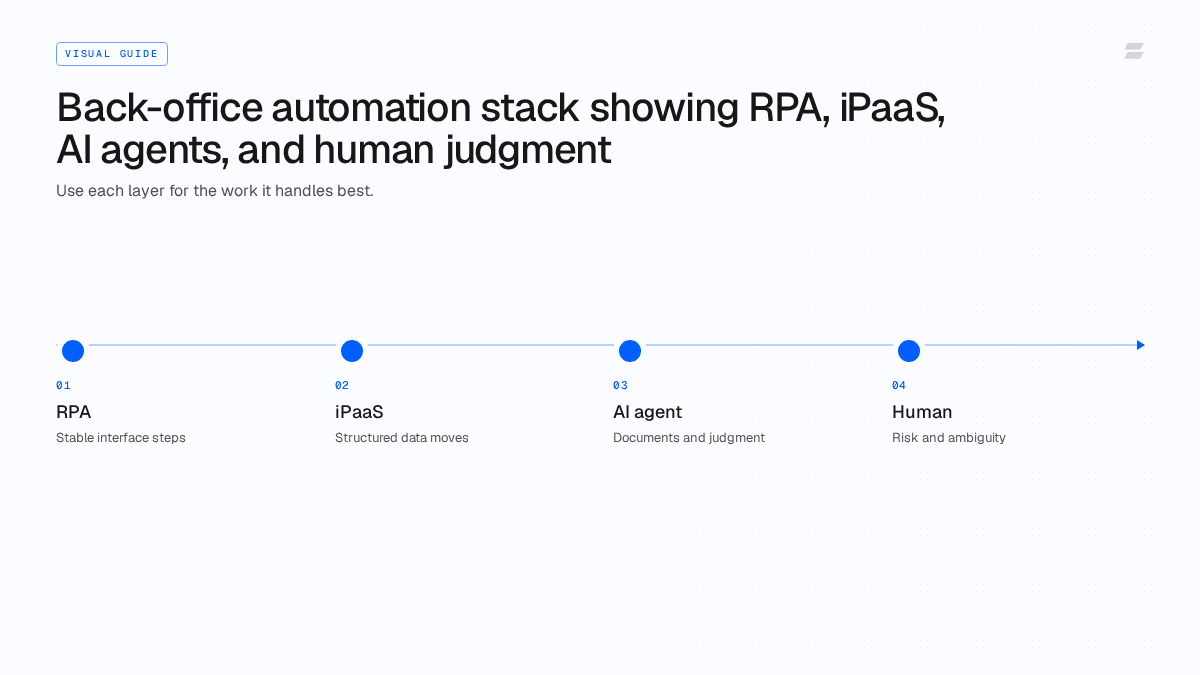
Each layer handles a different class of work, and the four sit on a spectrum from the most rigid to the most judgment-heavy:
Layer | Handles |
|---|---|
RPA | Stable, fixed UI steps |
iPaaS | Structured moves between systems |
AI agent | Documents plus judgment |
Human | Genuine risk and ambiguity |
Why the back office is where automation pays off
The back office is the natural home for automation because the economics are stark. The work is repetitive, the volumes are high, and the cost of a mistake compounds quietly.
Three forces make the case:
Cost. Back-office labor is one of the largest controllable line items in operations. Every invoice keyed by hand, every reconciliation done in a spreadsheet, every ticket routed manually carries a fully loaded labor cost. Estimates of the back-office automation software market vary by research firm and scope, roughly $6-16 billion in 2025, growing at a 9-14% annual rate through the early 2030s, but every estimate agrees on the direction: this is a large and fast-growing category precisely because the underlying labor cost is so visible and so easy to point at.
Error and rework. Manual data entry produces errors at a predictable rate, and in finance those errors are not cosmetic. A duplicate payment, a miskeyed invoice amount, or a missed accrual creates downstream rework, audit findings, and real cash leakage. Even strong AP teams still see meaningful exception rates on the invoices that do not match cleanly.
Cycle time. Manual back-office work is slow because it waits on people. An invoice sits in an inbox until someone opens it. A reconciliation waits for the analyst who owns it. A new hire cannot start until three different teams complete their steps in sequence. Automation collapses these waits, which is why metrics like days payable outstanding and time-to-onboard move sharply once the work is automated.
The strategic point is bigger than cost savings. The back office is where a company's operating capacity is set. If finance, procurement, and operations can only process what their headcount allows, the company's growth is capped by hiring. Automating that work uncouples capacity from headcount, which is the real prize.
RPA, iPaaS, and AI agents: what actually automates the back office
"Back office automation software" is not one thing. Three distinct technologies sit under the label, and confusing them is the most common reason automation projects underdeliver.
Robotic process automation (RPA) is the original approach. An RPA bot mimics a human clicking through a user interface: open this screen, copy this field, paste it there, submit. It is excellent for stable, structured, rules-based tasks where the inputs never vary, the same form, the same fields, every time. RPA's weakness is brittleness. Because the bot follows a fixed script tied to specific screen positions and layouts, any change, a vendor reformats an invoice, an application updates its UI, a field moves, breaks the bot. RPA estates are notorious for the maintenance burden they create: a large share of effort goes not into building new automations but into repairing the ones that broke when something upstream changed. For a deeper comparison, see AI agents vs RPA.
Integration platforms (iPaaS) connect systems through APIs rather than by clicking through screens. They are more robust than screen-scraping RPA for moving structured data between applications, syncing a record from an HRIS to a payroll system, pushing an approved invoice into an ERP. But iPaaS still operates on deterministic, pre-built workflows. It moves and transforms data; it does not read an ambiguous document or decide what to do with an exception.
AI agents are the layer that changes what is automatable. An AI agent can read unstructured input (a PDF invoice, an email, a contract), reason about it, take actions across multiple systems, and handle the cases that do not match the happy path. Crucially, agents can learn from corrections rather than requiring a developer to rewrite a script. Where RPA needs every rule specified in advance, an agent can be shown the goal and the guardrails and work out the steps, including the exceptions.
The practical model is not "pick one." RPA and iPaaS handle the deterministic plumbing; AI agents handle the judgment, the unstructured documents, and the exceptions. The shift underway is that the judgment layer, historically the part that stayed manual, is now automatable too. That is what moves the back office from "partially automated with a lot of human cleanup" to genuinely hands-off.
Back office automation examples across functions
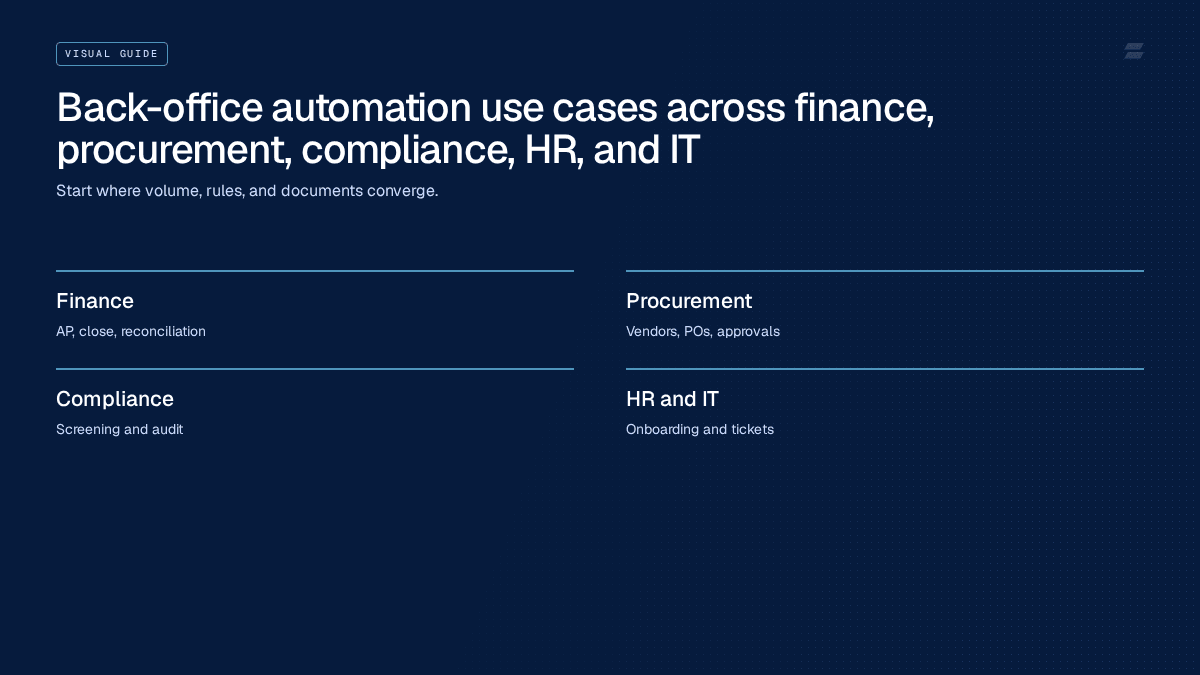
The fastest way to understand back office automation is to look at what it actually does, function by function. These are the highest-value, highest-volume processes where automation, and increasingly AI agents, removes the manual load.
Finance and accounting
Finance is the densest concentration of automatable back-office work, which is why it is usually where companies start.
- Accounts payable. Invoices arrive as PDFs and emails, get read, matched to purchase orders, coded, routed for approval, and paid. Done manually it is slow and exception-heavy; done with agents it becomes largely touchless. See how AI agents handle accounts payable and how an agent resolves AP invoice exceptions end to end.
- Invoice processing. Beyond AP specifically, the broader work of capturing, validating, and posting invoice data across the procure-to-pay loop is a prime agent use case. See how AI agents automate invoice processing end to end.
- General ledger reconciliation and close. Matching transactions across systems, investigating differences, and preparing journal entries is repetitive, rules-bound, and deadline-driven, ideal for automation that runs continuously rather than only at month-end.
- Bank statement processing. Statements arrive in inconsistent formats and have to be parsed, categorized, and reconciled. See automating bank statement processing with AI.
Chargebacks and disputes
Payment disputes are a back-office function that quietly drains margin. Each chargeback requires gathering evidence, assembling documentation, and responding within tight deadlines. Agents can read the shipping and transaction documents, build the representment package, and file it, turning a reactive, understaffed function into a managed one. See how AI agents fight chargebacks. This is one of the sharpest edges of back-office work in banking and financial services specifically, where dispute volume and evidentiary requirements are both high.
Procurement and vendor management
Vendor onboarding is a classic multi-week, multi-team bottleneck: collecting documents, running checks, creating records across systems. Automation compresses it from weeks to days. See AI agents in procurement and the comparison of vendor onboarding software and AI agents.
Document-heavy operations
Underneath finance, procurement, HR, and compliance sits a common layer: documents. Contracts, invoices, statements, forms, and IDs all have to be read, classified, and have their key fields extracted before any downstream process can run. This is where intelligent document processing matters, and where agents outperform older OCR-plus-rules pipelines because they handle layout variation and ambiguity instead of breaking on it.
HR and IT operations
Employee onboarding spans HR, IT, and finance: provision accounts, enroll in payroll and benefits, grant system access, send the right paperwork. IT service desks field a high volume of repetitive requests, password resets, access requests, routine tickets, that can be triaged and resolved automatically, with only the genuinely novel cases escalated to a person.
Across all of these, the pattern is the same: the work is high-volume, document-driven, and rules-bound, and the exceptions, not the happy path, are where the manual effort actually concentrates.
Where to start, by function
Pick a painful, measurable process with repeatable inputs. A few starting points by function:
- Finance: invoice processing, reconciliations, or journal preparation, wherever volume and rework are visible.
- Procurement: vendor onboarding and three-way matching, the two slowest steps in most procure-to-pay processes.
- Compliance: payment screening and KYC document checks, where speed and auditability both matter.
- HR and IT: onboarding paperwork and routine service-desk tickets, both high-volume and low-judgment.
From bots to an AI employee for the back office
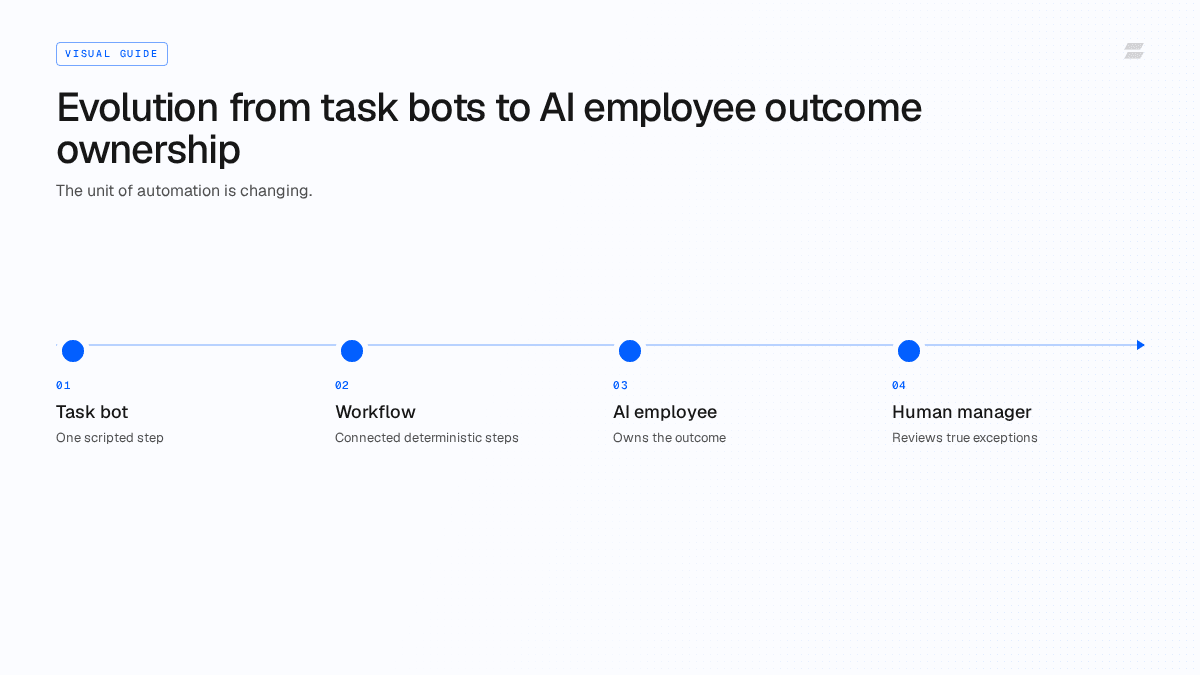
Here is the reframe that matters. For years, "back office automation" meant assembling a collection of bots and workflows, one per task, each narrowly scripted, each needing maintenance. You did not automate accounts payable; you built fourteen bots that each did a slice of accounts payable, and you employed people to watch them and clean up after the exceptions.
The AI-employee model inverts this. Instead of buying a tool and configuring dozens of brittle automations, you deploy an agent that owns an outcome, "keep accounts payable current and accurate", the way you would hand that outcome to a capable new hire. The agent reads the documents, follows the process, makes the routine decisions, escalates the genuinely ambiguous ones to a human, and gets better as it is corrected. It works inside your existing systems rather than replacing them.
The difference shows up most clearly in exceptions. A traditional automation handles the cases it was explicitly programmed for and dumps everything else into a human queue, which is why "automated" AP teams still spend most of their time on exceptions. An agent is built to handle the exception: a price variance, a missing purchase order, a duplicate, a tax mismatch. It investigates, decides or recommends, and only involves a person when judgment genuinely requires it.
This is the difference between automating tasks and automating a role. Zamp's deployments are built around this model, an AI employee for finance and back-office operations that runs the work end to end inside enterprise guardrails, with proven function depth across AP, invoice processing, chargebacks, vendor onboarding, and reconciliation. It is the same logic that, extended across every function, points toward the autonomous company.
Concretely, that means every job an agent owns runs against an Agent Operating Procedure (AOP) — the specific policy, tolerances, and escalation rules for that process — and draws on a shared Company Brain that holds the institutional context (vendor history, prior exceptions, approved judgment calls) so the agent doesn't start over on every case. Reviewed corrections feed back into the AOP automatically, and a process owner can adjust the policy directly, no engineering ticket required.
What to look for in back office automation software
Most back office automation tools demo well and disappoint in production, because the demo runs the happy path and production is mostly exceptions. When you evaluate options, judge them against the conditions that actually break automation in an enterprise back office.
Handles unstructured input, not just clean data. Real invoices, statements, and contracts arrive in inconsistent formats. Ask whether the system reads documents the way they actually come in, or whether it needs everything pre-structured. Screen-scraping and template-based OCR fail here; document-reading AI does not.
Learns instead of needing reconfiguration. When a vendor changes a layout or a new exception type appears, does the system require a developer to rewrite a rule, or can it learn from a correction? This single distinction determines whether your automation estate compounds in value or compounds in maintenance cost.
Owns the exception path. Ask what happens to the cases that do not match cleanly. A weak tool routes them all to a human queue. A strong one investigates the exception, resolves what it can, and escalates only what genuinely needs judgment.
Real, bidirectional integration. The system has to read from and write to your ERP, accounting platform, and systems of record, reliably and both ways. Surface-level connectors that only read are not enough.
Human-in-the-loop by design. In an enterprise back office, some decisions must have a human checkpoint. Look for human-in-the-loop controls that are built in, configurable by risk and dollar threshold, not bolted on.
Audit trail and observability. Every action the system takes should be logged, explainable, and reviewable. Finance and compliance teams cannot adopt a black box. Look for outcome ownership with a full decision audit trail — not just a system log, but a record of what was seen, decided, and why, tied to the specific case.
Deployment fit for your environment. A regulated back office (banking, insurance, healthcare) often can't run on a generic multi-tenant SaaS tool alone. Confirm the vendor supports the deployment model your compliance team actually requires, multi-tenant SaaS, a bring-your-own-cloud (BYOC) setup, or on-prem, rather than treating it as a future roadmap item.
Enterprise-grade, not SMB-generic. Many "AI automation" tools target small businesses with shallow, horizontal features. The enterprise back office needs depth in specific functions, security and access controls, and the ability to operate under real governance. Match the tool to the complexity of your environment.
If a vendor cannot speak credibly to exceptions, learning, integration, and auditability, the automation will stall the moment it leaves the demo.
How to get started with back office automation
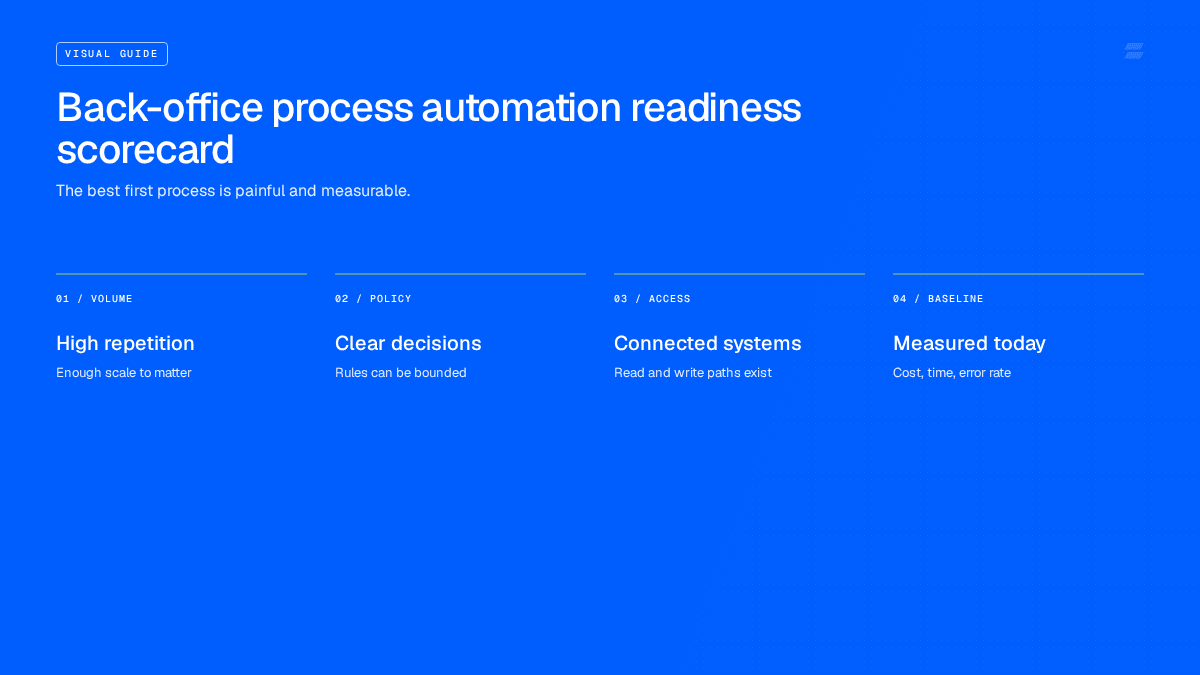
Successful back-office automation programs follow a recognizable path. The failures usually come from trying to boil the ocean or from automating a broken process instead of fixing it first.
- Pick a process that is high-volume and pained. Start where the manual cost and error rate are highest and the rules are clearest, accounts payable and invoice processing are common first choices for exactly this reason.
- Map the real process, including the exceptions. Document what actually happens, not the idealized version. The exceptions are where the value, and the difficulty, live.
- Choose the right technology for the work. Use deterministic automation (RPA/iPaaS) for stable, structured plumbing and AI agents for document reading, decisions, and exceptions. Do not force a script-based tool onto a judgment-heavy process.
- Keep humans in the loop where risk demands it. Set approval thresholds and review gates so the system escalates appropriately while still removing the bulk of the manual load.
- Measure outcomes, not activity. Track touchless rate, cycle time, exception rate, and error/rework, not just "number of automations built."
- Expand from a win. Once one function is genuinely hands-off, extend to adjacent processes that share documents and systems. This is how you move from automating a task to automating a function to running an autonomous back office.
The goal is not to deploy the most bots. It is to take a function off your team's plate entirely, reliably, and under control.
Frequently asked questions
What is back office automation?
Back office automation is the use of software, including RPA, integration platforms, and AI agents, to perform the administrative and operational work that runs a business behind the scenes, such as finance, accounting, HR, IT, and procurement, with little or no manual effort. It covers tasks like invoice processing, reconciliation, approvals, onboarding, and document handling.
What is the difference between front office and back office automation?
Front office automation targets customer-facing work such as sales and support. Back office automation targets the internal operational work that customers never see, finance, accounting, HR, IT, procurement, and compliance. The back office is typically more rules-bound and document-heavy, which makes it a strong fit for automation.
What is the difference between RPA and AI agents for the back office?
RPA bots follow fixed scripts to perform structured, repetitive tasks and break when screens or document formats change. AI agents can read unstructured documents, make decisions, handle exceptions, and learn from corrections without being reprogrammed. RPA is best for stable, deterministic steps; AI agents handle the judgment and the exceptions that RPA cannot.
Which back office processes should you automate first?
Start with high-volume, rules-bound, document-heavy processes where manual cost and error rates are highest. Accounts payable, invoice processing, reconciliation, and vendor onboarding are common starting points because the work is repetitive and the return is immediate and measurable.
Will back office automation replace finance and operations jobs?
In practice it shifts the work rather than eliminating the function. Automation removes the repetitive, high-volume processing and routine exceptions, while people move to oversight, judgment calls, edge cases, and higher-value analysis. Human-in-the-loop controls keep people in charge of the decisions that matter.
What should enterprises look for in back office automation software?
Prioritize the ability to read unstructured documents, learn from corrections instead of needing reconfiguration, own the exception path, integrate bidirectionally with systems of record, support human-in-the-loop controls, and provide a complete audit trail. Enterprise depth and governance matter more than a broad, shallow feature list.
The bottom line
Back office automation has moved past the era of brittle bots scripted to click through screens. The repetitive plumbing is still worth automating with RPA and integration platforms, but the part that always stayed manual, reading messy documents, making decisions, handling exceptions, is now automatable with AI agents that learn instead of break.
The strategic shift is from automating tasks to automating roles: instead of assembling dozens of fragile automations and staffing people to babysit them, you deploy an AI employee that owns a back-office outcome end to end, inside enterprise guardrails. That is how the back office stops capping growth and starts compounding it.
If you want to take a back-office function off your team's plate entirely, see how Zamp's AI employees run finance and back-office operations end to end, or book a demo to map your highest-volume process.